Context & Direct Insight
Most modern CRM tools force sales reps into a state of cognitive fatigue.
To understand the core workflow breakdown before designing a single screen, I audited active user frustrations across Reddit threads, Facebook sales communities, app store reviews, and informal user interviews. The data showed that reps spend up to 70% of their operational hours copying and pasting details across multiple window tabs.
A competitive audit of market leaders like Apollo and Lemlist revealed a critical structural flaw: they treat lead discovery and outreach execution as isolated feature sets, burying the transition action four clicks deep.
This platform transforms that fragmented journey into a highly responsive, single-pane system dashboard..
A record is only part of the decision.
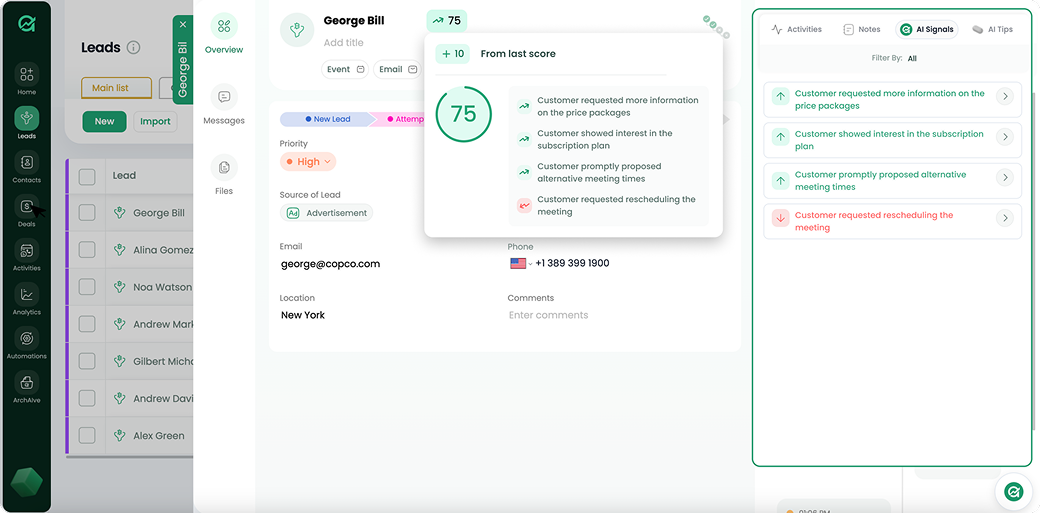
A list of leads is useful for scanning and comparing. Deciding what to do with a lead needs more context: contact information, company details and related activity. The interface needs to support both levels of work.
The design question: how can a person inspect a lead without losing their place in the larger list?
Map the wider workspace.
The product architecture connects account access, administrative flows, integrations and the lead workspace. Mapping those areas creates a framework for decisions inside the table and detail view.
Make room for detail without losing the list.
Open the detail beside the work.
The lead detail appears in a side panel, preserving the surrounding table. A person can inspect a record and return to the list without rebuilding their context.
The trade-off: The side panel has limited width. Longer content needs a clear hierarchy and a deliberate small-screen layout.
Let the table reflect the task.
Column configuration gives people control over which fields are visible. This accommodates different ways of reviewing and comparing leads.
The trade-off: Flexibility can increase setup effort. Useful default columns and a predictable way to reset the view remain important.
Use a consistent frame for related tasks.
The navigation, table area and detail surfaces establish a shared structure across the workspace. Repeating that frame keeps attention on the changing content.
The trade-off: Consistency should not force every task into the same pattern. Complex creation or editing work may need more space than a panel provides.
A connected lead workspace.
- A mapped structure for account, administrative and product workflows.
- Lead tables with contextual detail panels.
- Configuration patterns for adapting the workspace to the task.
The interface should help people move between overview and detail while preserving their place.
What I’d test next
I would test finding a relevant lead, comparing two records and returning to the previous table position. I would also check keyboard navigation, panel dismissal and the usefulness of default columns. These are proposed evaluations, not validated outcomes.
Explore the Figma library ↗