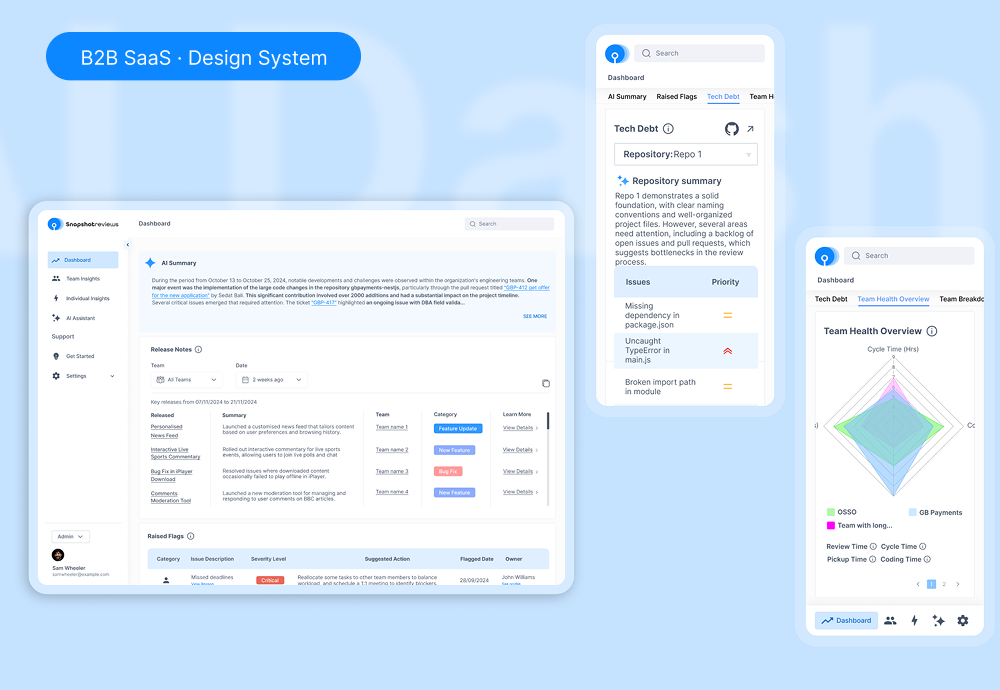
The interface had to handle a lot of different information.
Engineering dashboards bring together several kinds of information: summaries, release notes, warnings, tables and charts. AI-generated content adds another constraint: its length and structure can vary.
The design question: how can a system make this information easier to scan while accommodating detailed content and different screen sizes?
What the research said
To ground the system, I surveyed 36 engineering leaders and audited the workflows of existing platforms.
What the survey told me, and what I changed
- 86% said they’d abandon a metrics view if setup took more than three filter selections. So I capped configuration at three steps.
- 61% said sparse layouts and endless scrolling are why critical build failures go unnoticed. So I made the dashboard denser and moved key signals higher.
- 69% rely on manual code comments or keyword scripts and skip high-volume logs because of clutter. So I put an AI summary on top, with the detail one step below.
Start with the pieces that repeat.
I chose a highly rigid layout grid structure for global
navigation and core information density, but built individual
data cards to be fully responsive to variable AI content
lengths. This means standard elements like data tables have
fixed horizontal boundaries, while conversational spaces
dynamically expand based on code complexity.
The Figma file brings buttons, form controls, cards and other
interface elements into a shared library. The product screens
then reuse a common visual hierarchy for navigation, summaries
and more detailed information.
The details matter between states.
Separate the summary from the detail.
The dashboard places an AI summary alongside structured sections for release notes, raised flags and team information. This creates different levels of reading within the same page.
The trade-off: A summary helps with orientation, but it should not hide the underlying evidence. Detailed records need to remain accessible.
Make forms feel like one product.
Shared field, button and modal patterns connect actions such as estimation and uploading. Labels and grouping establish a consistent rhythm across tasks.
The trade-off: A shared component saves repetition, but specialised tasks still need clear instructions and meaningful validation.
Include the states between actions.
The upload designs include progress, success and error feedback. The empty-state design gives the AI workspace a starting point before it has useful content.
The trade-off: Status feedback needs an actionable next step. Error recovery and loading announcements are important follow-up checks for implementation.
The result is a more consistent base to build on.
- A shared component library for common controls and interface patterns.
- Dashboard designs bringing summaries, charts and tables into one hierarchy.
- Form, upload and empty-state designs for important product tasks.
A design system earns its place when it makes real product decisions easier to repeat.
What I’d test next
I would test whether users can find a flagged issue, trace a summary to its detail and recover from an upload failure. At the team level, I would track component adoption and recurring implementation inconsistencies. These are proposed checks, not measured improvements.